
ai-powered-accessibility-remediation2026-08-04T10:10:05+00:00
  • Accessibility Monitor

Accessibility monitoring that catches issues before your users do.

Scan every page across every site for WCAG 2.2 violations on a schedule. Get severity-ranked reports, change history and ticket-ready exports your engineers can pick up this sprint.

Accessibility Monitoring
Sitemap import

Simplify monitoring & development with sitemaps.

Import your sitemap.xml or point us at a domain — Barriano discovers every page, groups them by section, and schedules recurring scans so nothing new ever slips through the cracks.

  • Live multi-viewport audit

Live multi-viewport audit
Catch issues on every screen, not just the one on your desk.

Each audit runs across mobile, tablet and desktop viewports — so the bugs that only surface at certain breakpoints stop slipping through to production.

Multi Viewport Audit
high-volume scans

Complete high-volume scans in minutes.

Our distributed scanner crawls up to 20,000 pages per run in parallel — and only re-tests what changed since the last scan, keeping things fast and credit-efficient.

Coordinate site updates with your scanned data.

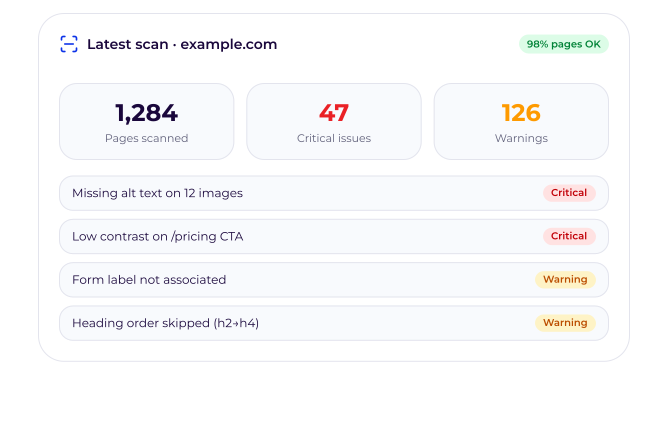
Every issue ships with a fix recommendation, a code snippet and a direct link to the offending element — so engineering knows exactly what to do.

Get the full list of issues

Sorted by severity, page, and WCAG rule. Nothing hidden, nothing duplicated.

Drill down to the exact element

Inspect the DOM node, the rule it failed, and a suggested fix in plain English.

Ship the fix in your stack

Copy a ticket, push to Jira, or import directly into your sprint.

Fix sitewide violations first.

Fix sitewide violations first.

Barriano groups identical issues across your whole site — so fixing a single component can clear thousands of failures at once. We tell you which one to fix next for the biggest impact.

  • Integrations

Export dev tasks to your favorite issue tracker.

One click to push prioritised, prefilled tickets straight into the tools your engineers already live in — with severity, WCAG rule and a fix recipe attached.

WCAG 2.2

AA-aligned rules engine

20k pages

Per scan, in minutes

Daily alerts

When new issues appear

Full history

Track trends over time

Accessibility Scanner pricing

Pages are fully flexible — spend your monthly page quota across any number of domains. Scan everything you own.

Save 20% on all yearly plans

Starter

500 pages / month

Perfect for small sites or a single product to keep accessible.

$25 /month

Billed monthly · cancel anytime

14-day free trial · No credit card

  • Manual scan on any domain (no limit)

  • WCAG 2.2 AA checks
  • Severity-ranked issues
  • Per-page issue breakdown
  • PDF & CSV export

Most Popular

Medium

1,500 pages / month

Best for content-heavy sites with regular publishing.

$60 /month

Billed monthly · cancel anytime

14-day free trial · No credit card

  • Manual scan on any domain (no limit)

  • WCAG 2.2 AA checks
  • Severity-ranked issues
  • Per-page issue breakdown
  • PDF & CSV export

  • Priority email support

Large

3,000 pages / month

For e-commerce, media and multi-brand portfolios.

$120 /month

Billed monthly · cancel anytime

14-day free trial · No credit card

  • Manual scan on any domain (no limit)

  • WCAG 2.2 AA checks
  • Severity-ranked issues
  • Per-page issue breakdown
  • PDF & CSV export

  • Priority email support

  • Onboarding session

FAQ

Frequently asked questions.

Everything teams ask before turning on Monitor.

Pourquoi ai-je besoin d’un outil de surveillance de l’accessibilité distinct ?2026-07-27T06:37:42+00:00

Le Widget résout les problèmes d’exécution rencontrés par les visiteurs, tandis que le Monitor détecte les problèmes structurels de votre code afin que votre équipe puisse les corriger à la source. Ensemble, ils vous garantissent à la fois une accessibilité immédiate et une conformité durable.

Puis-je voir les résultats de l’analyse dans mon tableau de bord ?2026-07-27T06:38:12+00:00

Oui. Chaque analyse ouvre un tableau de bord interactif affichant le nombre de problèmes par niveau de gravité, des vues détaillées par page, des extraits de code, des recommandations de correction ainsi qu’un rapport téléchargeable au format PDF ou CSV.

À quelle fréquence puis-je surveiller mes sites web ?2026-07-27T06:38:42+00:00

Lancez des analyses manuelles à la demande quand vous le souhaitez, sans limitation de fréquence tant que vous respectez le quota de pages prévu par votre forfait.

Que vérifie concrètement le moniteur ?2026-07-27T06:39:43+00:00

Toutes les règles WCAG 2.2 de niveaux A et AA détectables automatiquement : textes alternatifs manquants, rapports de contraste, mauvaise utilisation d’ARIA, structure des titres, étiquettes de formulaires, pièges au clavier, ordre de tabulation, etc.

Quels domaines puis-je analyser avec le Monitor ?2026-07-27T06:40:32+00:00

Tout domaine dont vous êtes propriétaire ou que vous êtes autorisé à analyser. Le module de surveillance est totalement dissocié du widget : vous pouvez auditer un seul domaine ou des centaines d’entre eux dans le cadre d’un même forfait.

Stop guessing if you’re compliant.

Plans start at 100 pages. Scale to 10,000+ as you grow.

Go to Top